Projects: keep a client's conversations together
Create a NeoSapien Project for a client or workstream on mobile, desktop or web, add related conversations, and ask Neo about them together.
- Guide
- Features
- Productivity
Projects works in the NeoSapien mobile app on iOS and Android, the desktop app and the web app. Create a Project for a client or workstream and add related conversations, including Neo 1 site visits and desktop reviews. Use the same NeoSapien account across devices to keep that context together as requirements and decisions change, then ask Neo questions about the Project.
Setup in the mobile app
- Open the NeoSapien mobile app and open the Projects list from Memories.
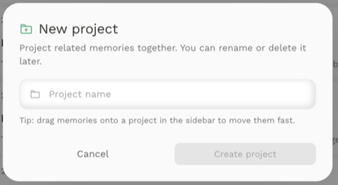
- Tap Create a project, enter a name such as “Client A”, then tap Create project.
- Open a relevant memory, tap Add to a project and choose Client A. Repeat for the related Neo 1 and desktop conversations you want to keep together.
- Open Client A from the Projects list and use Ask Neo to ask about its memories. Check that the selected context is Client A, then try the question below.
Setup on desktop or web
- Sign in to https://app.neosapien.ai/ or open NeoSapien Desktop.
- Hover over All Memories in the sidebar and click +. Enter a client or workstream name, such as “Client A”, then click Create project.
- Open a relevant memory, click Add to project in its header and choose Client A. Repeat for related Neo 1 and desktop conversations. You can also drag a memory onto the Project in the sidebar.
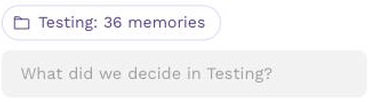
- Open Client A from the sidebar, then open Ask Neo. Check that the selected context shows the Project name and memory count.
- Ask: “What changed in Client A's requirements, which commitments remain open, and what should I clarify next?” Review the source memories in the answer.
Frequently Asked Questions (FAQs)
Currently, we do not offer international shipping. However, for customers in USA, we are available on Amazon US
The battery lasts up to 16 hours.
Yes, a metal chain is included with Neo 1.
Yes. Neo1 can continue capturing conversations even if your phone does not have internet, as long as it remains connected to your phone via Bluetooth. The captured conversations will be processed into memories once your phone is back online.
Yes, Neo 1 is compatible with both iOS and Android devices. You can download the NeoSapien app from the Google Play or App Store.
No, Neo 1 only uses the audio file to transcribe information. It does not store any audio recordings. You can also delete any of these transcriptions from the app and they will be removed from all our servers.
Your data is encrypted in transit and at rest and securely stored on our cloud, ensuring maximum privacy and protection. Audio files are not stored once processed. Neo 1 is audited by 3rd party security agencies to ensure that all information is 100% secure and private.
No, Neo 1 is not water-resistant. If it comes into contact with water, ensure you dry it immediately.
The product will be dispatched in 2-3 days.
No. The desktop app is free with Neo 1, just like the mobile app. Sign in with the same account and your memories sync across both.
Yes — macOS 13 or later (Apple Silicon) and Windows 10 or later. You can download either from neosapien.ai/desktop.
All of them. It captures audio directly from your laptop, so Zoom, Google Meet, Teams, WhatsApp and any other call are covered — and no bot joins your meeting.